What if the biggest setup hurdle isn’t the myQ app, but identifying which kind of opener control you have? For a myQ smart garage control setup in Wenatchee, integrated myQ openers and add-on hubs can require different pairing steps. Start with the right setup type, then check that the opener and its regular remote work reliably before relying on app control.
Before you begin, identify your opener and myQ device, follow the instructions for those exact models, and test the door with the path clear. This guide explains how to pair each setup, troubleshoot common connection issues, and tell a network problem from a possible opener or door issue.
If the opener also behaves inconsistently with its normal controls, treat that as an equipment concern rather than an app setup problem. Affordable Garage Door Repair & Sales LLC provides garage door repairs, safety inspections, opener replacements, and smart upgrades in Wenatchee. First, identify whether myQ is built into your opener or supplied by a separate hub.
Key Takeaways
- Identify whether your opener has built-in myQ or needs a separate control device before starting setup.
- For myQ smart garage control setup Wenatchee, follow the current app prompts and the instructions for your specific device.
- Compare built-in control, an add-on hub, and existing remotes to understand what each setup requires.
- Use low-risk checks for connection or pairing problems, and test door operation safely before relying on app control.
- If setup reveals an opener problem, an opener evaluation or smart upgrade can help restore reliable function.
Before myQ Setup in Wenatchee: Identify Your Opener and Control Type
If you want to open or close the garage door remotely, first identify the opener and myQ equipment already installed. Pairing the app is a setup task. A door that struggles, reverses unexpectedly, or won’t operate consistently may need attention to the opener or door itself. Treating those as separate issues helps prevent an app connection from being mistaken for a mechanical fix.
myQ is a connected garage access system that works with compatible opener equipment. Some openers have myQ capability built in; others use a separate add-on hub and sensor kit. The distinction matters because the equipment and pairing steps differ. A working handheld remote is a separate control method, not proof that an opener can connect to myQ. For general background on opener mechanisms and remote-control technology, see How Garage Door Openers Work.
How to tell which myQ setup you have
Look for the opener’s model and product label on the exterior of the motor unit. Check any paperwork or packaging you still have. Don’t remove the opener cover, reach near wiring, or climb to an unsafe position to read a label. If you can’t see it safely, use the opener’s manual or documentation.
An integrated smart opener has connected-control capability built in. An add-on system uses a separate hub, usually with a sensor that communicates the door’s position. Check the equipment already installed, then compare both the opener model and myQ device model with the manufacturer’s current compatibility information. Don’t assume compatibility based only on brand, age, or a working remote. For myQ smart garage control setup Wenatchee, the setup path depends on the exact opener and control equipment.
What to prepare before opening the myQ app
Gather the equipment details and instructions first so you can follow the right setup steps:
- The opener’s model information and any myQ device model number.
- The device’s current installation and pairing instructions.
- A smartphone with the myQ app installed or ready to install.
- Your home Wi-Fi details and the network information required by that specific device.
Check the device manual and current manufacturer guidance for network requirements and setup steps. Requirements can vary by device, so don’t use instructions for a different hub or opener. Before testing any control, clear the floor and doorway, and keep people, pets, and objects away from the door’s path. If the door already behaves inconsistently with its normal controls, pause setup and address the possible opener or door issue first.
How to Set Up myQ: Pair the App, Opener, and Control Device
Once you’ve identified your equipment, follow the setup path for that model. Button names, indicator lights, and pairing order can differ between openers and myQ devices. Keep the device manual nearby and follow the current app prompts instead of relying on instructions for a similar-looking unit.
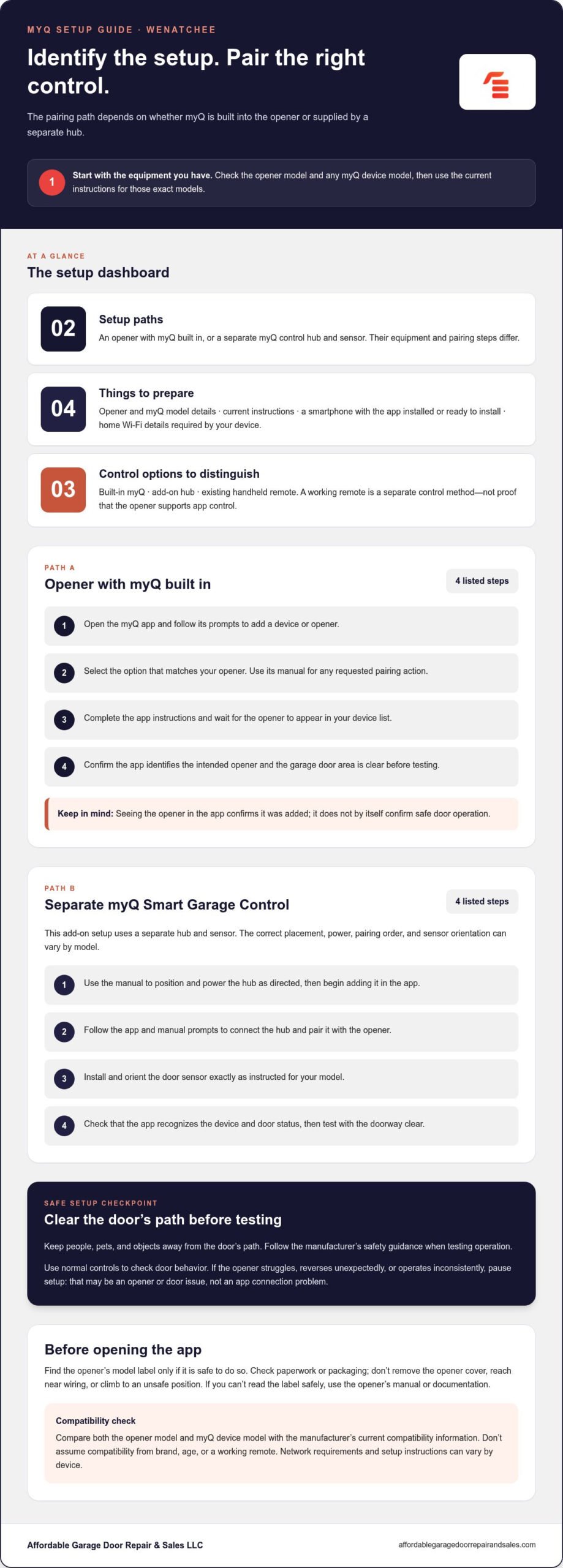
Setup for an opener with myQ built in
For an integrated opener, add the opener through the app’s current device setup flow. The app may ask you to sign in or create an account, select an opener type, and follow model-specific pairing prompts. Use the manual to locate any controls or indicators mentioned in the instructions. Don’t assume every opener uses the same button or sequence.
- Open the myQ app and follow its prompts to add a device or opener.
- Select the option that matches your opener, then use its manual for any requested pairing action.
- Complete the app’s instructions and wait for the opener to appear in your device list.
- Before testing, confirm the app identifies the intended opener and the garage door area is clear.
Seeing the opener listed confirms that it has been added to the app, but doesn’t by itself confirm safe door operation. Test using the opener’s normal controls and follow the manufacturer’s safety guidance. The Federal Safety Standards for Garage Door Openers address safety requirements for residential operators, including entrapment protection.
Setup for a separate myQ Smart Garage Control
An add-on control uses a separate hub and sensor. Follow the device’s instructions for placement, power, app pairing, and sensor installation. The correct order can vary by model. Use the diagram and steps supplied for your specific device rather than assuming a generic sensor position or sequence.
- Use the manual to position and power the hub as directed, then begin adding that device in the app.
- Follow the app and manual prompts to connect the hub and pair it with the opener.
- Install and orient the door sensor exactly as instructed for your model.
- Check that the app recognizes the device and door status, then test operation with the doorway clear.
If the opener won’t pair or its ordinary controls are unreliable, pause before repeating setup attempts. A smart feature can’t correct an underlying opener problem. If you’re considering replacing the opener as part of a smart upgrade, review this garage door opener replacement guide. Affordable Garage Door Repair & Sales LLC provides opener evaluations and smart upgrades for Wenatchee homeowners.
MyQ Setup Compared: Built-In Control, Add-On Hub, and Existing Remotes
The right control option depends on your opener and how you want to use it day to day. An integrated myQ opener may connect without a separate hub. An add-on control requires an existing opener that meets the device’s compatibility requirements. A handheld remote remains useful for local operation, but it doesn’t establish that the opener supports app control.
| Control option | What it requires | Where setup happens | What to verify |
|---|---|---|---|
| Integrated myQ opener | An opener model with built-in myQ capability | In the myQ app, following the opener’s instructions | Exact model compatibility and successful app recognition |
| Add-on Smart Garage Control | A compatible opener and the specific hub-and-sensor equipment | In the app and at the hub and sensor locations, as directed | Opener compatibility, device instructions, and sensor status |
| Existing remote control | A functioning opener and its matched remote | At the opener, using the opener’s instructions | Reliable local operation; a remote alone doesn’t confirm myQ support |
When an integrated myQ opener is the simpler route
If the opener supports built-in myQ, integrated control avoids adding a separate hub. That can mean fewer pieces of equipment to place, but you still need to follow model-specific instructions. Check the exact opener model against current manufacturer compatibility guidance, then use the app prompts and opener manual to set it up. Confirm the manufacturer’s current documentation supports the feature before proceeding.
When an add-on control or opener upgrade makes sense
An add-on hub may suit an existing opener if that exact model meets the control device’s compatibility requirements. The hub and sensor still need to be installed and paired according to their instructions. If the opener is faulty, unreliable, or unsuitable for the control system you want, address the opener rather than repeatedly attempting app setup. This Washington garage door installation buying guide can help frame a broader replacement project.
For myQ smart garage control setup Wenatchee, choose between integrated control and an add-on based on the opener’s model and condition, rather than assuming one option is best for every home. App control supplements the opener and its physical safety systems. It doesn’t replace sound door hardware, safe operation, or a working remote. NIST’s Smart Home Security and Privacy Considerations offers broader context for connected devices. Keep account access secure and confirm that the door operates reliably with its regular controls.
Troubleshoot myQ in Wenatchee: Connection Problems and Safe Tests
A failed app connection doesn’t automatically mean the opener is broken. Start with checks that don’t involve wiring or moving door hardware. Use the symptoms to narrow down whether the issue is with the app, connection, or opener. For myQ smart garage control setup Wenatchee, follow the current manufacturer troubleshooting guidance for your specific device.
Never bypass safety sensors or work on springs to fix an app connection. If the door binds, moves unpredictably, makes an unusual sound, or shows visible damage, stop testing and keep clear of it.
If myQ won’t connect or appear online
Check whether the app is working and whether your phone and home network have a connection. Then check that the myQ device has power and that its indicators match the meanings in its manual. Compare your setup with the manufacturer’s current troubleshooting instructions. Don’t remove opener covers, alter wiring, or repeatedly reset equipment unless the device instructions direct you to do so.
If other devices are also offline, the issue may involve the home network. If the opener works normally with its usual controls but the myQ device remains offline, focus on the app, network, or connected device. An offline status alone doesn’t establish a mechanical fault.
If pairing fails or the device won’t stay connected
Confirm that the app and device instructions match the exact opener and myQ control model. Pairing prompts and indicator sequences can vary, so restart only as directed by the manufacturer. Check the device’s power and network status before trying again. If pairing still fails after you follow the instructions, note any displayed message or indicator pattern. Those details can help distinguish a connection issue from an opener problem.
If the app connects but the door doesn’t respond
Keep people, pets, and objects out of the door’s path. If the door looks intact and has been operating normally, make one controlled test using its regular wall control and the opener manual’s safety instructions. Don’t stand under a moving door or reach into its path.
- If the wall control operates the door normally but the app command doesn’t, check the myQ device status and follow its current troubleshooting guidance.
- If the wall control also fails, or the door hesitates, binds, reverses unexpectedly, or appears damaged, stop testing. The issue may involve the opener or door hardware and needs assessment beyond app setup.
Affordable Garage Door Repair & Sales LLC provides garage door repairs and safety inspections in Wenatchee. If normal controls or door movement remain unreliable, schedule a Wenatchee garage door assessment to address the equipment concern before relying on app operation.
Get Reliable myQ and Opener Support in Wenatchee
App setup is often a homeowner task when the opener works normally and the only issue is adding a device or connecting it to the network. Follow the current myQ app prompts and the instructions for your exact equipment. A failed pairing attempt alone doesn’t prove the opener needs replacement. Connection problems and mechanical problems call for different next steps.
Consider a professional assessment if the opener also fails with its regular controls, operates inconsistently, or shows visible damage. Unusual movement, binding, or a door that won’t open or close reliably can signal an issue beyond app setup. Stop testing if the door behaves unpredictably, and don’t try to correct an app problem by adjusting springs or bypassing safety equipment.
When an opener evaluation can help
Affordable Garage Door Repair & Sales LLC provides garage door repairs, opener replacements, and safety inspections in Wenatchee. An assessment can help distinguish an opener fault from a connection issue and identify a practical path toward reliable operation. Depending on the equipment and its condition, the solution may involve repair, replacement, or a smart upgrade. The decision should be based on how the door and opener function, not the assumption that every pairing issue calls for new equipment.
For example, if the myQ app reports an offline device but the opener works normally from its wall control, begin with device and network troubleshooting. If the wall control also fails or the door moves unevenly, treat that as an opener or door concern. Keep people and objects clear, and avoid repeated tests when the door’s condition is uncertain.
Plan your next step in Wenatchee
Before arranging an assessment, write down the opener model and note where setup stops. Include whether the app recognizes the device, any message or indicator you see, and whether the opener works from its normal controls. These details help focus the assessment on the actual symptom. If you’re weighing whether replacement makes sense, this garage door opener replacement guide can help you consider the decision.
For homeowners planning a myQ smart garage control setup Wenatchee, a smart upgrade can be a practical next step if the existing opener isn’t suitable or dependable. Affordable Garage Door Repair & Sales LLC offers free on-site estimates for relevant opener projects. Discuss a smart upgrade based on the opener and door you have, then choose a next step that fits their condition.
Make Your Next Garage Upgrade Work for Your Home
Connected access is most useful when it fits the way your household uses the garage and the opener operates dependably. Before changing equipment, consider what you want the setup to improve, then compare that with the condition and capabilities of your current opener. This helps avoid replacing sound equipment to solve a connection issue, while leaving room for an upgrade when the opener itself is no longer suitable.
For help planning a myQ smart garage control setup Wenatchee, Affordable Garage Door Repair & Sales LLC provides smart upgrades and opener replacements. The company serves homeowners in Wenatchee, Everett, Puyallup, Seattle, Tacoma, Auburn, Yakima, Pasco, Ellensburg, and Spokane. Free on-site estimates are available for relevant opener projects.
Explore smart garage door upgrades and local opener support in Wenatchee. Contact Affordable Garage Door Repair & Sales LLC to discuss your opener and plan a reliable next step.
Frequently Asked Questions
Does myQ work with every garage door opener?
No. myQ works with most openers made after 1993, but compatibility depends on the exact opener and control device. Some systems may need an additional compatible door control, so don’t rely on the opener’s brand or a working handheld remote as proof. Match the model number to current manufacturer compatibility guidance before choosing equipment. That model check is an important first step for myQ smart garage control setup Wenatchee.
Can I set up myQ myself?
Often, yes, if the equipment is compatible and you can follow its current instructions. Keep the opener and myQ device manuals available, and use the app prompts for your exact models. You can handle app and account steps yourself, but stop if setup appears to require wiring changes or the opener behaves abnormally. In Wenatchee, treat those signs as equipment concerns, not routine app setup.
Why is my myQ garage door control offline?
An offline status can result from a loss of power to the connected device, a home network interruption, or a problem with the app or device connection. Check whether the device has power and whether your network is working before changing settings. myQ requires a 2.4 GHz Wi-Fi network, so a network mismatch can matter. Follow current manufacturer troubleshooting instructions, and don’t alter opener wiring to restore the connection.
Does myQ need Wi-Fi to work?
Yes, connected myQ control requires Wi-Fi, and the network requirement provided for myQ is 2.4 GHz. If your home network is down, don’t rely on the app to operate the door. A wall button or handheld remote may still control the opener independently, but rely on those controls only if they operate normally. Check the myQ device manual for its specific network instructions.
What should I do if myQ says the door is closed but it is open?
Don’t rely on the app’s status alone. From a safe position, visually confirm the door’s actual position and keep the doorway clear. If your setup uses a separate sensor, consult that device’s instructions for checking its position and communication with the hub. Don’t assume the door is secure or leave it unattended based only on an inaccurate status. If the mismatch continues, stop relying on app status until it’s resolved.
Can a myQ connection problem mean my garage door opener needs replacement?
Not by itself. If the door operates normally from its usual controls, the issue may be limited to the app, network, or connected device. If the opener also fails with its regular controls, operates inconsistently, or the door shows damage, arrange an assessment instead of repeating app setup. Affordable Garage Door Repair & Sales LLC serves Wenatchee with opener evaluations and replacements when needed to support reliable operation.