What if the right way to program your LiftMaster remote depends on the opener, not the remote? If you’re learning how to program LiftMaster garage door opener controls, generic instructions can be confusing when the buttons or sequence don’t match your unit. Identifying the opener first helps you follow the right steps and avoid an unnecessary reset.
Start by locating the model information and Learn button on the opener. Then use the instructions that match your model to pair a remote or keypad. This guide covers how to identify your opener, follow the appropriate pairing process, and test the control safely. You’ll also find practical checks for common problems, including power, Lock Mode, and sensor alignment, along with signs that it’s time to stop troubleshooting. If programming isn’t the cause, opener repair or replacement may be the next step.
Key Takeaways
- Identify your LiftMaster opener and check its manual before pairing a control, since steps vary by model.
- Use the Learn function to pair a remote, following the exact sequence for your opener.
- If pairing fails, check the control’s battery and compatibility, confirm you’re using the right instructions, and distinguish a programming issue from inconsistent opener or door operation.
- Remote, keypad, and vehicle controls may each require a separate pairing process. Repeated failures can point to an opener issue rather than a setup mistake.
Before programming a LiftMaster garage door opener, identify your model
Before pairing a remote, identify the opener it will control. LiftMaster openers and accessories can use different programming procedures, so a sequence that works for one model may not work for another. If you’re learning how to program LiftMaster garage door opener controls, start with the model information and matching owner’s manual instead of trying button combinations at random.
Find the model label on the opener and note the complete model number. Record any other identifying details on the label, such as a date or serial number, if present. These details can help you find the correct instructions. The Learn button is another useful clue, but its location and appearance vary by model. Don’t assume every opener uses the same button sequence or rely on a generic diagram.
Where to find the LiftMaster model and learn button
Check the opener housing for its identification label, then look for a button marked “Learn.” Its location and appearance can differ between models. Don’t remove covers or reach into the mechanism to search for it. If the label is hard to read, the button isn’t obvious, or the controls don’t match the instructions you found, consult the manual for that exact model before proceeding.
The electric garage door opener relies on coordinated mechanical and electronic components. For programming, the opener’s own instructions are the practical reference. Use them to confirm the correct Learn-button procedure for your unit and control.
What to prepare before pairing a remote
Gather the items and information you need before starting. This makes it easier to follow each step in order and reduces the chance of pressing the wrong control while searching for instructions.
- Identify the control: Have the specific remote, keypad, or other accessory you plan to pair with the opener.
- Keep the manual close: Use the owner’s manual that matches the opener’s model number. Follow its Learn-button directions, including any model-specific timing or button actions.
- Prepare a safe test: Clear people, pets, vehicles, and stored items from the door’s path before testing. Keep a clear view of the door as it moves.
Programming should involve only the opener’s designated controls and the accessory instructions. It should not require adjusting springs, cables, or door hardware. Those parts affect the door’s movement and are separate from remote pairing. If the door or hardware appears damaged, stop and address that issue before testing the opener.
How to program a LiftMaster remote using the opener’s learn function
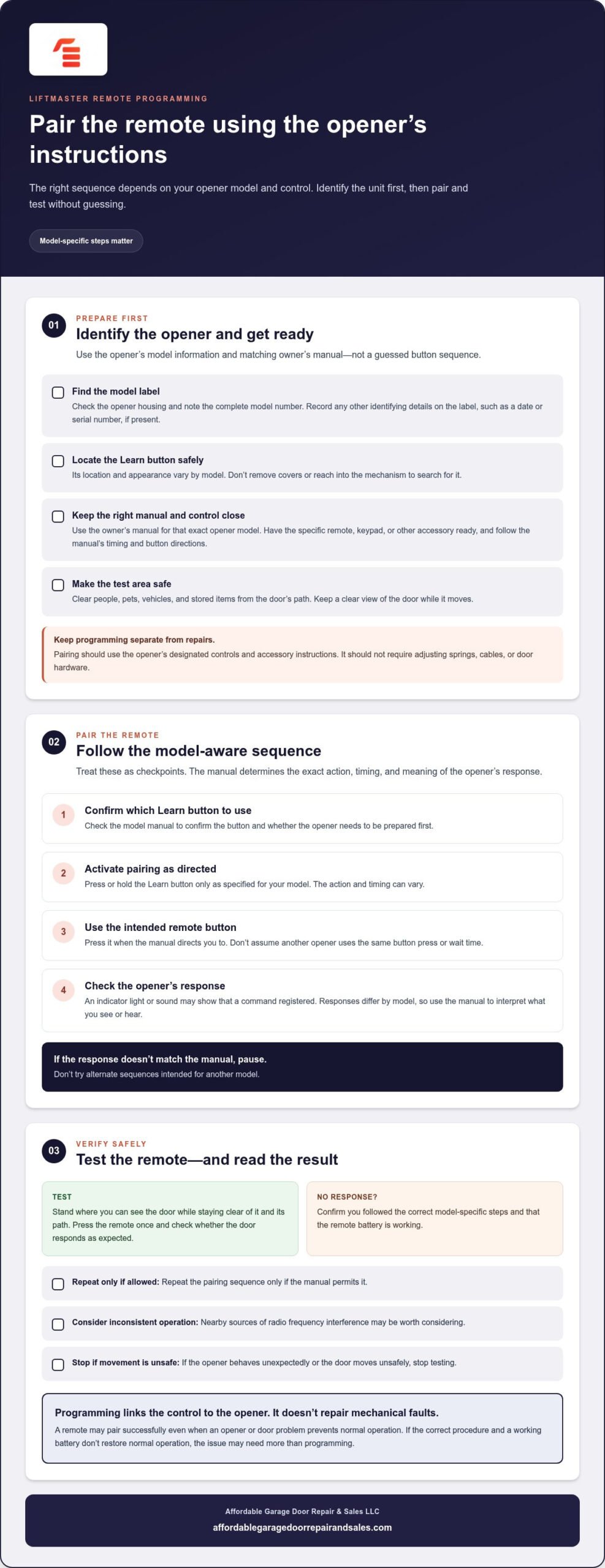
Once you’ve confirmed the opener model, use its owner’s manual to guide the pairing process. LiftMaster pairing steps depend on the opener model and control. There isn’t one button sequence or timing rule for every unit, so treat the steps below as a framework and follow your model’s exact instructions.
A model-aware sequence for pairing a LiftMaster remote
Before starting, have the correct manual and the remote you intend to pair ready. The manual should explain what the opener’s indicator means and how quickly to complete each action.
- Locate the Learn button. Use the model manual to confirm which button to press and whether you need to prepare the opener first.
- Activate pairing as directed. Press or hold the Learn button only as specified for your model. The action and timing can vary.
- Use the remote in the instructed sequence. Press the intended remote button when the manual directs you to. Don’t assume that the same button press or wait time applies to every opener.
- Watch or listen for the opener’s response. An indicator light or sound may show that a command registered, but responses differ by model. Check the manual to interpret what you see or hear.
If the indicator response doesn’t match the manual, pause instead of trying alternate sequences. Instructions intended for another model may not complete pairing correctly.
How to check whether the remote was programmed
When you’ve completed the manual’s pairing sequence, stand where you can see the door while staying clear of it and its path. Press the remote once and check whether the door responds as expected. Keep people, pets, vehicles, and stored items away from the moving door.
If there’s no response, confirm that you followed the correct model-specific steps and that the remote battery is working. Repeat the sequence only if the manual allows it. If operation is inconsistent, nearby sources of radio frequency interference may be worth considering. Don’t change opener settings based on guesswork.
Stop testing if the opener behaves unexpectedly or the door moves unsafely. Repeated attempts won’t resolve a mechanical problem. If the correct procedure and a working battery don’t restore normal operation, the issue may need more than programming. Garage door opener repair or replacement can be a practical next step when checks point to an opener fault.
When LiftMaster programming fails: check the remote, opener, and door
A remote that won’t work doesn’t always mean the pairing sequence failed. Use the symptoms to narrow down whether the issue involves the control, opener, or door. If you’re checking how to program LiftMaster garage door opener controls, first distinguish a complete lack of response from a door that responds but moves abnormally.
Programming changes the link between a control and the opener; it doesn’t repair mechanical faults. A remote may pair successfully even when an opener or door problem prevents normal operation.
The remote does not activate the opener
If pressing the remote produces no response, start with these checks before repeating the pairing process:
- Check compatibility. Confirm that the remote is intended to work with your opener model. Similar-looking controls can use different pairing procedures.
- Inspect the battery. If it’s depleted or the remote’s indicator is weak, replace the battery according to the remote instructions.
- Recheck the model-specific sequence. Use the opener’s manual and follow its exact Learn-button directions. Don’t substitute a sequence from a different model.
- Check basic opener power and settings. Confirm that the opener has power. If your system has Lock Mode on the wall control, check whether it’s active.
If the opener’s indicator suggests pairing completed but the remote still has no effect, don’t cycle through unrelated button combinations. The remote may be incompatible, or the opener may have a separate issue that needs attention.
The opener responds, but the door does not operate normally
If the opener clicks, lights up, or otherwise responds to the remote but the door doesn’t move as expected, treat it as a possible door or opener fault, not a pairing problem. Check only what you can observe safely. Don’t keep operating a door that is jammed, off-track, visibly damaged, or moving unpredictably. Keep clear of it and avoid adjusting springs, cables, or other hardware.
Garage door openers have safety systems designed to help protect people and property. The Door & Access Systems Manufacturers Association explains relevant UL 325 safety standards. If the door’s movement appears unsafe or the opener behaves abnormally, stop testing rather than attempting to bypass a safety feature.
If basic programming checks don’t resolve the issue and the opener itself may be at fault, review this garage door opener replacement guide for information about replacement considerations. Persistent problems may call for opener service rather than another pairing attempt.
Program a LiftMaster keypad or vehicle control without mixing up the steps
A keypad, handheld remote, and built-in vehicle control aren’t interchangeable during setup. Each accessory may require its own model-specific sequence, even when it connects to the same opener. To learn how to program LiftMaster garage door opener accessories, use the instructions for both the accessory and the opener instead of repeating the remote steps for every control.
| Control | What to check | Setup distinction |
|---|---|---|
| Handheld remote | Remote compatibility and opener model | Follow the opener manual’s Learn-button sequence. |
| Keypad | Keypad and opener instructions | Pairing and PIN creation or changes may be separate steps. |
| Vehicle control | Vehicle system and opener manuals | Setup may involve training the vehicle control, then syncing it with the opener. |
LiftMaster keypad programming considerations
Treat pairing the keypad and choosing or changing its PIN as separate steps. The opener’s manual explains how to activate its learning process, while the keypad instructions cover entering a PIN and sending it to the opener. Follow the directions for the exact models. Don’t assume a keypad uses the same button presses or timing as a handheld remote. Clear the door area before testing the keypad.
Pairing a vehicle’s built-in garage door control
Vehicle controls have their own setup instructions, so keep the vehicle documentation alongside the opener manual. Depending on the system, pairing may involve teaching the vehicle control the remote’s signal, then syncing it with the opener while the opener is in its model-specific learning mode. Follow the manuals in order because the sequence and indicator responses can vary.
After setup, test the vehicle control from a safe position where you can see the door and stay clear of its path. If the opener doesn’t respond, compare the instructions for both systems before trying again. Stop if the door behaves unpredictably.
If model-specific setup checks don’t resolve an opener problem, explore opener service and upgrade options as a practical next step.
When to get LiftMaster opener help in Washington
Before arranging service, make a final safe check of the basics: confirm the opener’s model, consult its matching manual, check the control’s battery, and make sure you followed the model-specific pairing steps. If you’re still asking how to program LiftMaster garage door opener controls after following those instructions, repeated attempts may not help. The problem may involve the opener or door rather than the connection between them.
Signs the issue may need opener service
Consider diagnosis if the remote or keypad repeatedly fails to pair after you’ve checked compatibility and followed the correct instructions. Service may also be appropriate if the opener makes unusual noises, works inconsistently, or shows visible damage. Reprogramming alone won’t resolve those symptoms.
Stop using the opener if the door is jammed, off-track, damaged, or moving unpredictably. Keep people clear, and don’t try to force the door or adjust its hardware. Avoid opening the motor housing or attempting electrical repairs unless you have the appropriate qualifications. A professional can assess whether the issue calls for opener repair or replacement based on the condition found, rather than on the programming failure alone.
A practical next step for Washington homeowners
Affordable Garage Door Repair & Sales LLC provides residential and commercial garage door service across Washington, including opener replacement, smart upgrades, and repair. The company serves customers in Everett, Puyallup, Seattle, Tacoma, Auburn, Wenatchee, Yakima, Pasco, Ellensburg, and Spokane. The right option depends on what’s causing the problem: a control setup issue, an opener fault, or another condition affecting door operation.
If replacement may be appropriate, review the garage door opener replacement buying guide to understand what to consider. If basic checks haven’t restored reliable operation, get local garage door service to assess the opener and door. A clear diagnosis can help determine the next step without repeating programming attempts.
Pair your LiftMaster control with confidence
Successful programming starts with identifying your opener and following the instructions for its exact model. Remote, keypad, and vehicle controls can use different pairing steps, so check the matching manual instead of relying on a universal sequence. If the control still won’t work, check its battery and pairing process, then consider whether the symptoms point to an opener or door issue. Knowing how to program LiftMaster garage door opener controls also means knowing when to stop troubleshooting and keep clear of unsafe door movement.
When programming checks don’t resolve the problem, Affordable Garage Door Repair & Sales LLC provides residential and commercial garage door repair, opener replacement, and smart upgrades throughout Washington, including Everett, Puyallup, Seattle, Tacoma, Auburn, Wenatchee, Yakima, Pasco, Ellensburg, and Spokane. Get help with your garage door opener.
Frequently Asked Questions
How do I program a LiftMaster garage door opener remote?
To learn how to program LiftMaster garage door opener remotes, first identify your opener model and find its matching manual. Follow the manual’s Learn-button instructions, then press the remote button only when directed. Button actions and timing differ by model, so avoid relying on a universal sequence. Check the opener’s indicator response against the manual, then test the remote while standing clear of the door and its path.
Where is the learn button on a LiftMaster garage door opener?
The Learn button is on the opener unit, but its location and appearance vary between models. Check the unit’s label for the model number, then use the matching owner’s manual to find the button and confirm what it looks like. Don’t remove covers or guess at similar-looking controls. If the label or button is difficult to identify, use the manual’s diagrams before starting programming.
Can I program a LiftMaster remote without the learn button?
Some older openers may support programming through a multifunction wall control, but the available method depends on the model. Check the opener’s owner’s manual for instructions specific to your unit before trying another procedure. If you can’t locate a Learn button, don’t open the motor housing or experiment with wiring. Confirm the model and controls first, and stop if the instructions don’t match your opener.
Why is my LiftMaster remote not programming?
A depleted remote battery, incompatible remote, or incorrect model-specific sequence can prevent pairing. Check the battery, confirm the remote is suitable for the opener, and follow the manual’s instructions carefully. Also verify that the opener has power and that Lock Mode isn’t active, if your wall control has that feature. If the opener responds but the door moves abnormally, stop testing. Affordable Garage Door Repair & Sales LLC serves Everett, Puyallup, Seattle, Tacoma, Auburn, Wenatchee, Yakima, Pasco, Ellensburg, and Spokane.
How do I program a LiftMaster keypad?
Use the instructions for both the keypad and the opener, since the pairing sequence depends on their models. Treat pairing and setting or changing the keypad PIN as separate tasks. The manuals explain when to activate the opener’s learning function and when to enter the PIN. Don’t use remote-control instructions for keypad setup. After pairing, test the keypad with the door area clear and remain where you can see the door move.
Will programming a new LiftMaster remote erase my other remotes?
Pairing a new remote through the opener’s model-specific instructions generally adds that control; it isn’t the same as intentionally erasing stored controls. However, button actions can have different effects depending on the opener. Don’t hold the Learn button or use a reset procedure unless your manual specifically directs you to do so. If keeping existing remotes working is important, check the manual before programming and test the controls afterward.
Can I program my car’s built-in control to a LiftMaster opener?
Many vehicle systems can be paired with a compatible opener, but the procedure depends on the vehicle and LiftMaster models. Follow both manuals. Some setups first train the car’s control using a handheld remote, then sync it with the opener while the opener is in its model-specific learning mode. When setup is complete, test from a safe position with a clear view of the door and no one in its path.